
Git Standards
It is required that all developers use Git to manage the source control of the projects development files which will allow versioning and the ability to revert back to previous versions of development if required.
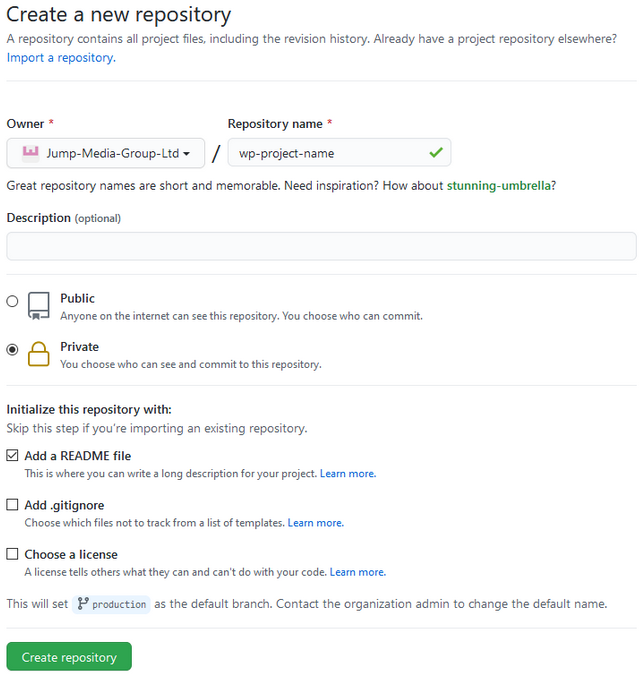
All project development is required to be set up as a private GitHub repository from within the Jump Media's GitHub Organization and GitHub Team.
GitHub Guidelines & Jump Best Practices
All development projects are required to pushed and backed up to Jump Media's GitHub account.
Project repositories are required to be set to 'private' and assigned to the Jump-Media-Group-Ltd GitHub organization, following naming convention: projecttype-projectname
eg.
- wp-jump-media
- laravel-jump-media
All projects should include a README file, which will be used to document the project and requirements to setup the website or application. Please ensure that the default branch is renamed to 'production'.
.gitignore
It is required that all repositories include a .gitignore file to ignore all core files and any sensitive information from being pushed to the repository. It is required that no files contain any logins and credentials for any accounts or connection details to any databases.
Any sensitive information required for the project should be stored within environment files which will be git ignored.
See our .gitignore templates for reference
Git Branch Structure
Jump Media follow a GitFlow branching model for development to ensure sustainability of development code and backups. This will allow for better maintenance for stable development.
For a detailed breakdown of the GitFlow branching model, please see: https://datasift.github.io/gitflow/IntroducingGitFlow.html
It is required that developers follow this approach to organise the scaling of the development with multiple developers working on the project.
Git Branch Structure:
Production Branch
The production branch is the lead branch and will contain all of the production development files.
It is required that this branch matches the development files currently deployed on the production server for the application.
It is required that no development is carried out on this branch, but merged into it from the release and hotfix branches.
Develop Branch
The develop branch will contain the latest stable development files which will be merged in from feature and hotfix branches.
Any new development features will be forked from this branch.
Release Branches
Release branches will be created to store stable development files staged for deployment. It is required that this branch is fully tested and signed off before merging into the production branch.
Development will be merged into release branches from the develop branch.
It is required that the latest release branch is deployed on the staging server and signed off before merging into the production branch and deploying to production server.
Feature Branches
Feature branches will be created for all new development, each feature/functionality will be located within its own feature branch for better separation. It is required that all features are tested and signed off before merging into the develop branch and develop branch is tested once features have been merged.
Hotfix Branches
Hotfix branches will be created to store all development that has been done to resolve any bugs or issues with previous releases.
Depending on what branch the bug is located within, hotfix branches should be forked off and merged back into the branch once the issue has been resolved, tested and signed off.